PRO · SCENE COMPOSER · BETA

Put a whole scene
on a printed page.

A 3D editor in your browser. Stack video, green-screen cut-outs, 3D, text, and sound on the artwork you already print. Publish a QR; anyone opens it with a phone, no app.

Pro is in beta. We're inviting testers in small groups. The demo needs no account.
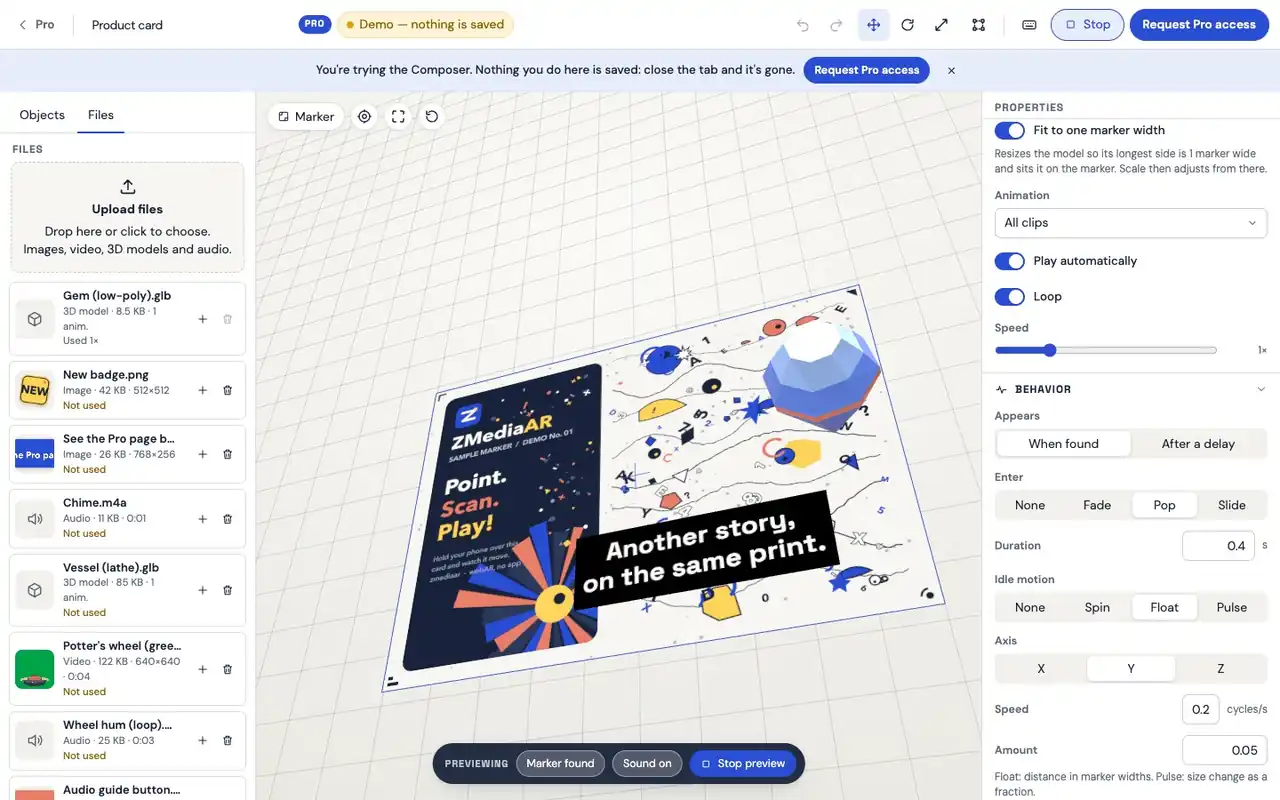
The Composer previewing a printed card: the headline 'Another story, on the same print.' on a black plate and a floating blue 3D gem, with the Files list on the left, the Behavior settings on the right and a Preview bar at the bottom.
Screen recording of the real editor, about half a minute, not sped up, no cuts.

The recording above is a screen capture of the real Composer. It starts on an empty card, adds a text object and types a headline, adds a 3D gem from the Files panel, drags both into place with the move handles, sets how the gem enters and idles, and previews the scene.

WHAT THE COMPOSER ADDS

Same tracking.
More layers.

The viewer, the QR, and the scan are the ones every ZMediaAR experience uses. The scene is what changes.

Content PRO · BETA

  • Video, up to 3 per scene
  • Green-screen video
  • Images with transparency
  • 3D models, GLB/glTF, with animation clips
  • Text in four styles
  • Audio: soundtrack or spatial
  • Shapes and lights

Interaction PRO · BETA

  • Appear on found, or after a delay
  • Enter: fade, pop, slide — even up out of the paper
  • Idle: spin, float, pulse
  • Tap to open a link or play/pause
  • Replay every time the print is found again

Tracking & stability

  • Tracks the real printed artwork All plans
  • Scan-reveal intro, on or off per scene All plans
  • Pose stabilizer All plans
  • Media pauses when the print leaves the frame

Sharing & analytics

  • Share link and QR All plans
  • Framed, titled QR codes with the Z mark All plans
  • PNG and SVG export for print All plans
  • Printable one-pager All plans
  • View counts today All plans
  • Per-scene analytics Coming soon

All plans marks what every experience already has, free or Pro. Anything unmarked belongs to the Pro Scene Composer, in beta.

WORKFLOW

Four steps,
one browser tab.

Nothing to install, nothing to export. Upload, arrange, publish, scan.

  1. STEP 01

    Upload the print

    JPG, PNG, or WebP of the artwork. The tracking target compiles locally, with a quality hint before you commit.

  2. The Composer's Files panel listing a 3D gem, a badge and other files, each with an Add to scene button, next to a gem just placed on the printed card
    STEP 02

    Add items

    Drag files into the scene: video, images, 3D, audio. Add text and shapes from the toolbar. Position, rotate, and scale each one on the print.

  3. The Composer's Behavior panel for a badge: Appears after a delay of 0.9 seconds, Enter as Pop for 0.4 seconds, Idle motion as Pulse
    STEP 03

    Set behavior

    Choose when each item appears, how it enters, how it idles, and what a tap does.

  4. STEP 04

    Publish and scan

    One click. Get a link, a framed QR, and a printable one-pager. Scan it on your own phone before you print a thousand.

SMALL MOMENTS

The details that
make it feel real.

Hover, tap, or focus a card to play it. These are drawings of the behavior, not viewer footage. Branded QR codes are on How it works.

PRO · BETA

Green screen

Key the backdrop out in the editor. Tune similarity, softness, and spill until the edge is clean.

PRO · BETA

Animated 3D

Pick a clip, loop it, set the speed. The model is sized to the print automatically.

PRO · BETA

Text that lands

Headline, caption, price. Outline and a backing plate keep it readable on busy artwork.

PRO · BETA

Sound with a place

Spatial audio gets louder as the phone moves toward the source.

ALL PLANS · ON/OFF PER SCENE

Scan-reveal

The print lights up, then the scene builds in sequence. Turn it off for an instant start.

ALL PLANS

Pose stabilizer

Smooths out hand shake so the scene sits still on the paper.

PRO · BETA

Tap actions

A model opens your shop. A video pauses. Nothing else to build.

BUILT FOR PHONES

Limits that keep it
fast on a real phone.

Every scene plays in a mobile browser on the kind of phone people actually carry. The Composer keeps you inside these lines so it stays smooth.

Items
20 per scene
Video
3 per scene, up to 50 MB each
Audio
4 tracks per scene, up to 15 MB each
Lights
4 per scene
3D models
GLB or glTF, up to 25 MB, with a triangle-count warning on heavy models
Images
PNG, JPG, or WebP up to 10 MB, transparency kept
Total assets
150 MB per scene
Text
Up to 500 characters per label

STATUS

What's shipped,
what's next.

No promises beyond this table. Rows move as things ship; they don't disappear.

FeatureStatus
One video on a print, with QR, one-pager, and view countsShipped
Image tracking on the real print, no appShipped
Pose stabilizer and scan-reveal introShipped
Framed, titled QR export (PNG and SVG)Shipped
Scene Composer: video, images, 3D, text, audio, lights, shapesIn beta
Green-screen videoIn beta
3D models with animationIn beta
Enter and idle animations, delays, replay on re-findIn beta
Tap actions: open a link, play or pauseIn beta
Per-scene analytics beyond view countsComing soon
Pro pricing and self-serve upgradeComing soon

Shipped: in the free product today. In beta: in the Composer, for accounts with Pro access; may change. Coming soon: planned, not available.

PRO QUESTIONS

Before you
ask for access.

Who can use the Composer today?

Accounts we've invited to the Pro beta. Request access and tell us what you want to print; we're adding testers in small groups.

Does Pro change how people scan?

No. Same QR, same browser viewer, same print. The scene is bigger; the scan is the same.

Do I need 3D skills?

No. Drop in a GLB from any 3D library or tool, and the Composer sizes it to your print. Everything else is sliders and dropdowns.

What does green-screen need from my video?

An evenly lit, single-colour backdrop and a subject that doesn't wear that colour. Export as MP4 (H.264); you tune the key in the editor.

Will my Free experiences still work?

Yes. Free experiences stay as they are. Pro adds a second kind of experience; it doesn't replace the first.

What will Pro cost?

We haven't announced pricing. Pro is by invitation while we shape it, and we'll give notice before anything changes. The pricing page always has the current picture.

TRY IT

Try the Composer.
Nothing is saved.

No account. The demo opens the real editor with a sample scene: move things, add your own images and models, press Preview. Close the tab and it's gone.
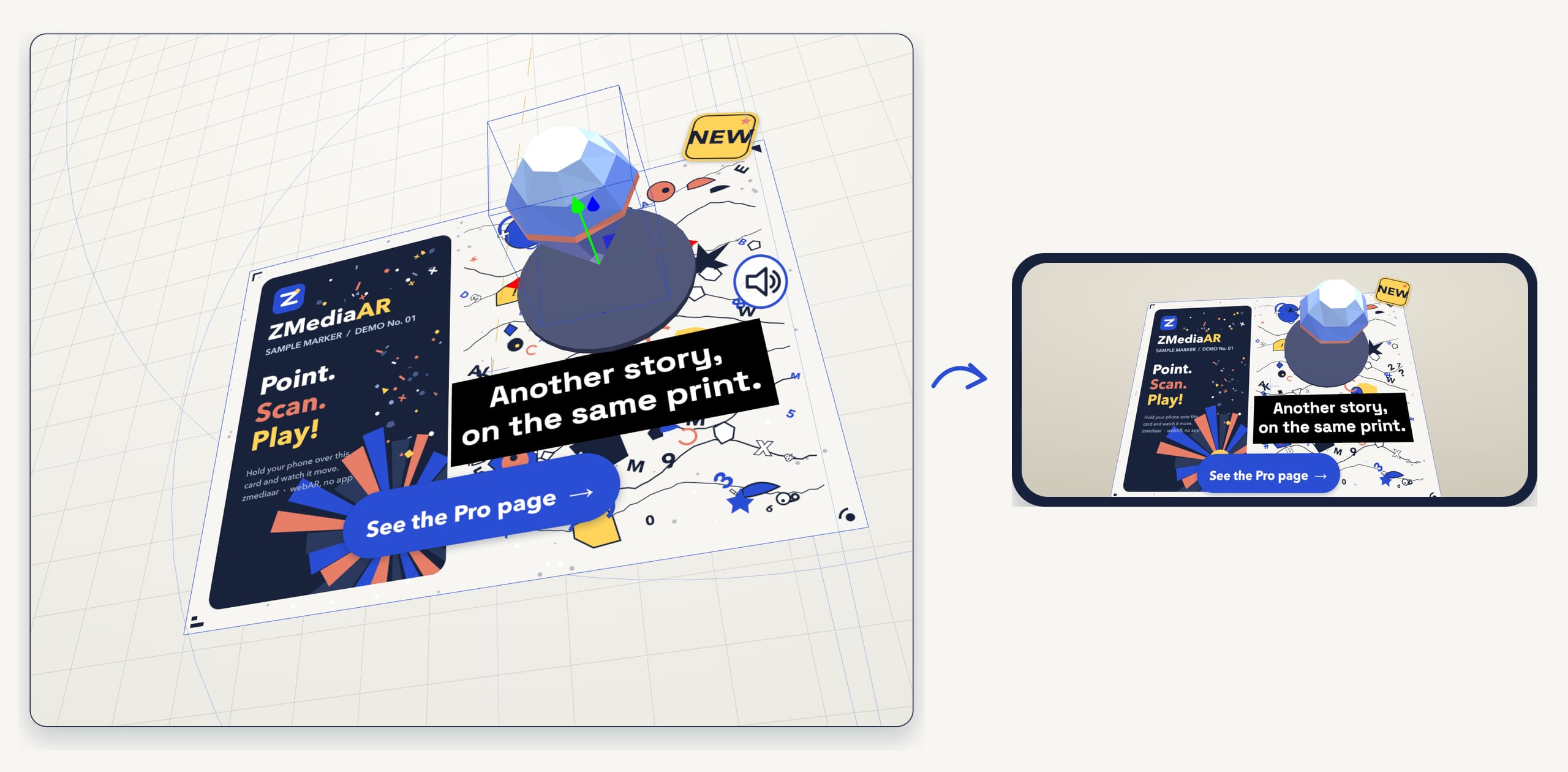
The sample scene, a printed card with a headline on a dark plate, a floating 3D gem, a NEW badge and a See the Pro page button, as the viewer shows it in a phone-shaped frame; on wide screens beside the editor's 3D viewport.
Left: the editor's 3D viewport in your browser. Right: the in-browser preview of the same scene in a phone-shaped frame. The phone viewer tracks your printed marker.The in-browser preview of the scene in a phone-shaped frame. The phone viewer tracks your printed marker.

Give your print
a whole scene.